OpenDroid puts an AI agent on Android: the user states a goal, the system decomposes it into steps, then operates the phone. It illustrates the shift from AI that answers to AI that acts. It does not, by itself, prove that OpenDroid is reliable enough for unsupervised use.
 A mobile agent turns a natural-language request into actions on Android.
The 30-second version
- What is it? An open-source Android AI agent under the Apache 2.0 license.
- What does it address? Repetitive manual work across mobile applications.
- What is changing? AI is receiving tools to inspect interface state and act, rather than merely generate text.
- Who should care? Android developers, AI engineers, architects, and automation teams.
- How seriously should you take it? Try it on a secondary device; do not grant it broad access to a phone holding important data.
Start with the basics: What is it?
An AI agent receives a goal, selects steps, and uses tools to change its environment. Instead of explaining how to open the Clock app, an agent can open it, create an alarm, and read back the resulting state.
OpenDroid supports cloud or local LLMs. Its repository advertises system control, communications, calendar, maps, and screen-reading capabilities. That is a feature inventory, not a guarantee of compatibility with every device.
Core architecture: The execution loop
The basic flow has four parts:
- Interpret intent: The LLM turns the request into a plan.
- Act: The agent calls an executor, such as opening an app or creating an alarm.
- Observe: Accessibility Service reads the UI tree; a vision engine can inspect the screen.
- Re-evaluate: The result returns to the loop, which continues, replans, or reports an error.
The repository separates the agent loop, planner, vision engine, memory, and more than 60 action executors. API keys use Android Keystore, while data sent to cloud models remains subject to each provider’s policies.
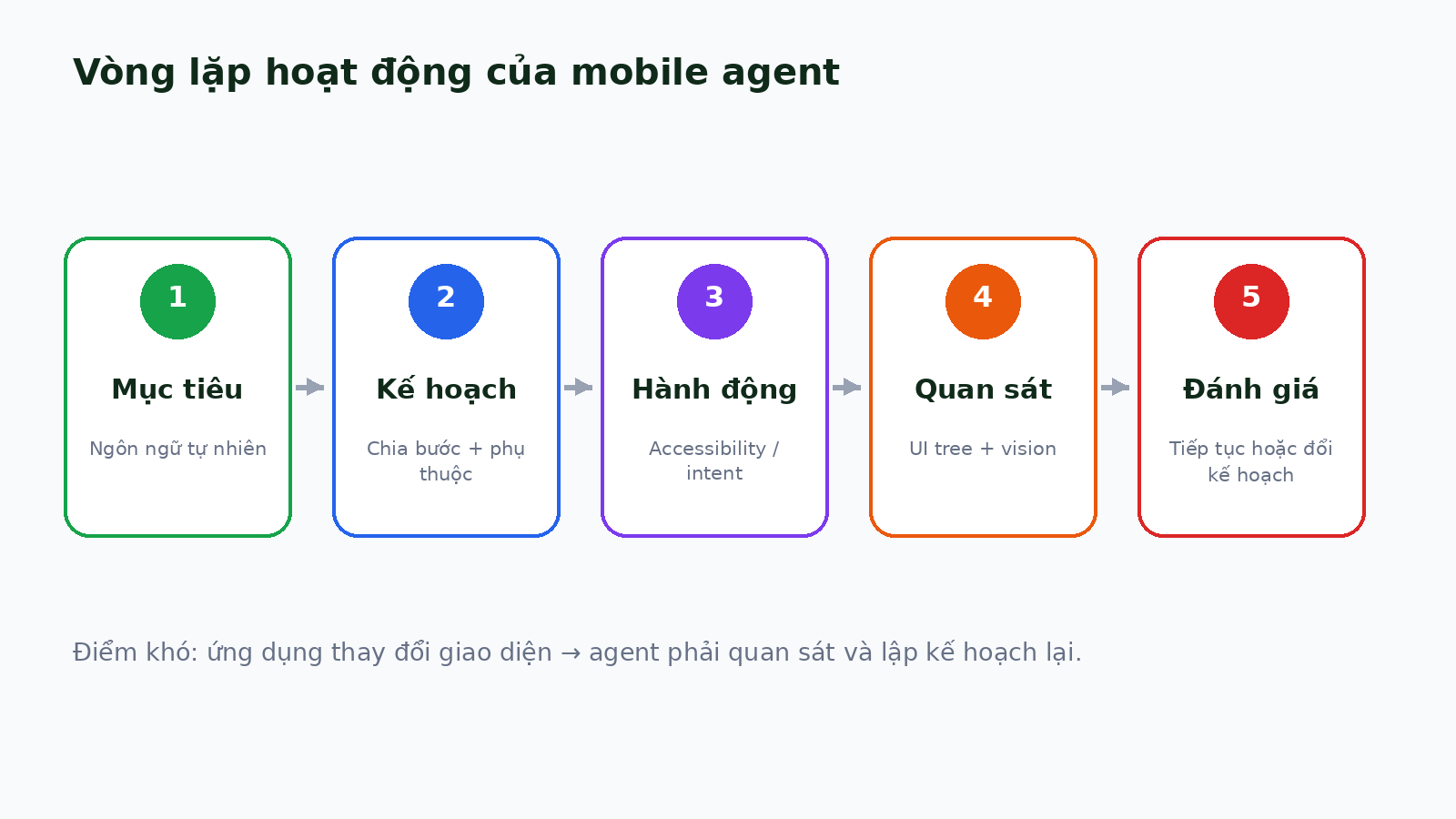 Planning, action, observation, and re-evaluation form the control loop.
What is actually new?
AI-driven UI control is not new. OpenDroid’s contribution is packaging several ideas into an installable open-source application that combines multiple LLMs, memory, and mobile actions.
The project publishes source code, APKs, releases, and a roadmap. However, “production-ready” and “self-verifying” are primarily maintainer claims. No independent, multi-device OpenDroid benchmark currently establishes its success rate.
Why is this attracting attention now?
Multimodal models, local inference, and Android AppFunctions are converging. AppFunctions lets applications expose tools to agents, but as of August 2026 it remains an experimental preview; Gemini integration remains in private preview.
Over time, agents may prefer AppFunctions because structured calls are more stable and governable. Accessibility Service would then remain a compatibility layer. This hybrid model is more realistic than relying only on “look and tap.”
Evidence that the trend is emerging
- Google has announced AppFunctions and experimental UI automation for Gemini.
- At the time of research, OpenDroid had more than 400 commits, downloadable APKs, and a v1.0.6 roadmap dated August 20, 2026.
- AndroidWorld evaluates 116 tasks; its strongest original baseline achieved 30.6%.
- AndroidLab reports gains after training, while average results still show a substantial reliability gap.
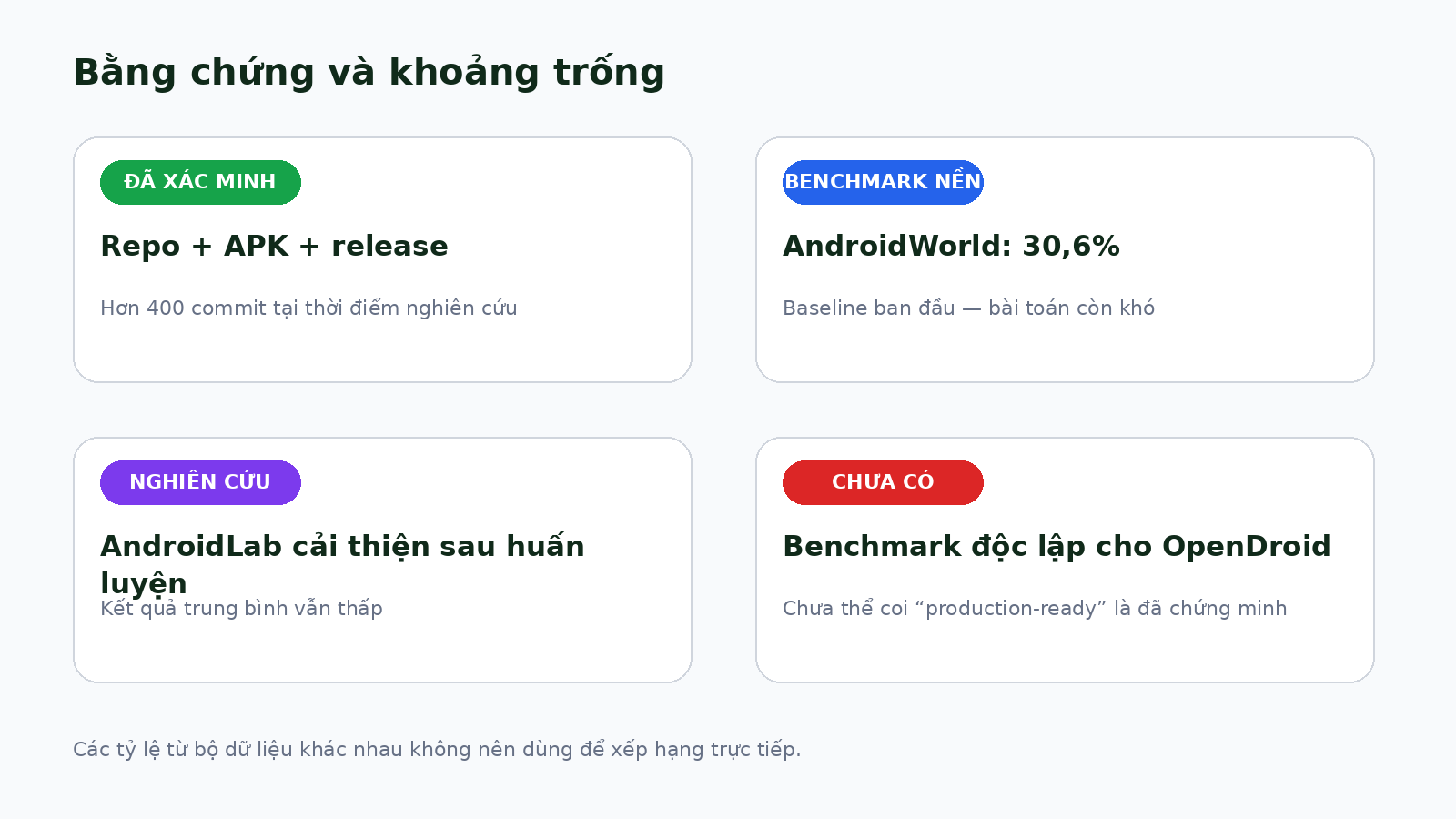 The current evidence base and the validation gap specific to OpenDroid.
- Trend stage: Emerging.
- Confidence: 78/100 for the mobile-agent trend; roughly 60/100 for OpenDroid’s maturity.
- Assessment: The ecosystem is moving toward agents that act, but OpenDroid should be treated as a fast-moving experimental platform, not a sufficiently reliable autonomous assistant for sensitive tasks.
Real value and hype
What is verifiable
The source, APK, action executors, and agent loop can be inspected. OpenDroid is useful for learning mobile-agent architecture and reduces dependence on a single LLM provider.
What remains uncertain
Accessibility Service has broad authority, so inference errors can have real consequences. The project has not published a security advisory. UI changes can break automation; payments, messages, and destructive operations require explicit confirmation.
Who is affected?
- Users: Fewer repetitive actions, but only if they understand the granted permissions.
- Developers: Applications need functions agents can invoke safely.
- Architects: Systems need policy, least privilege, audit logs, and rollback.
- Businesses: Managed devices offer a bounded environment for automation pilots.
Practical applications
Opening apps, creating alarms, and summarizing a screen have been demonstrated. Cross-application tasks are possible but brittle; unconfirmed transactions remain unsafe.
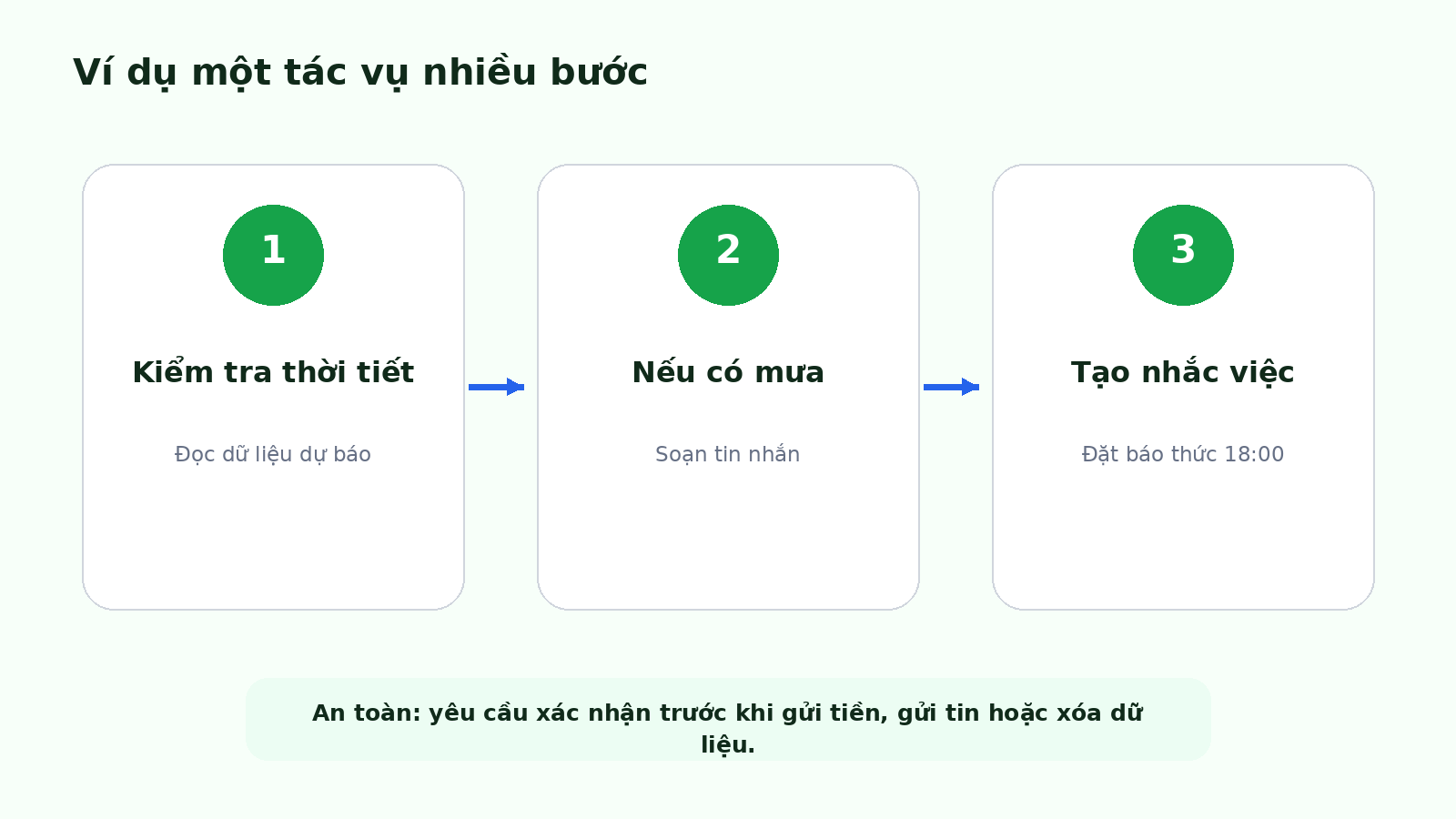 An example of a conditional, multi-step mobile workflow.
Three opportunities worth testing
1. A mobile-agent reliability harness
- Type: Open-source/devtool.
- Audience: QA automation, Android developers, and AI engineers.
- Problem: Demos lack repeatable measurement on real devices.
- Idea: Define 20–30 Android tasks with logs and automated scoring.
- Smallest experiment: Run five tasks 20 times each on an emulator and one physical device.
- Estimated effort: 5–7 days; signal window: two weeks.
- Primary risk: Standardizing application state is difficult.
- Continue if: Results expose reproducible failures; stop if: scenario maintenance costs more than the evidence is worth.
- Opportunity Score: 82/100.
2. A confirmation and safety-policy layer
- Type: SDK/consulting.
- Audience: Mobile architects and security engineers.
- Problem: An agent can act beyond user intent.
- Idea: Classify risk, require confirmation, restrict data, and retain an audit trail.
- Smallest experiment: Wrap three actions: sending a message, creating a calendar event, and opening a payment link.
- Estimated effort: 1–2 weeks; signal window: 30 days.
- Primary risk: Platform APIs are still changing.
- Continue if: The layer integrates with two agents; stop if: every project requires a large bespoke adapter.
- Opportunity Score: 86/100.
3. An internal agent for dedicated Android devices
- Type: Enterprise pilot.
- Audience: Warehouse, retail, and field-service operations.
- Problem: Employees repeat data entry and lookups on company devices.
- Idea: Automate one workflow that does not involve payment or sensitive data.
- Smallest experiment: A sandbox device fleet with ten users and one workflow.
- Estimated effort: 3–4 weeks; signal window: six weeks.
- Primary risk: Wrong actions, data leakage, and weak ROI.
- Continue if: It saves more than 20% of task time while staying below the business error threshold; stop if: continuous supervision is required.
- Opportunity Score: 74/100.
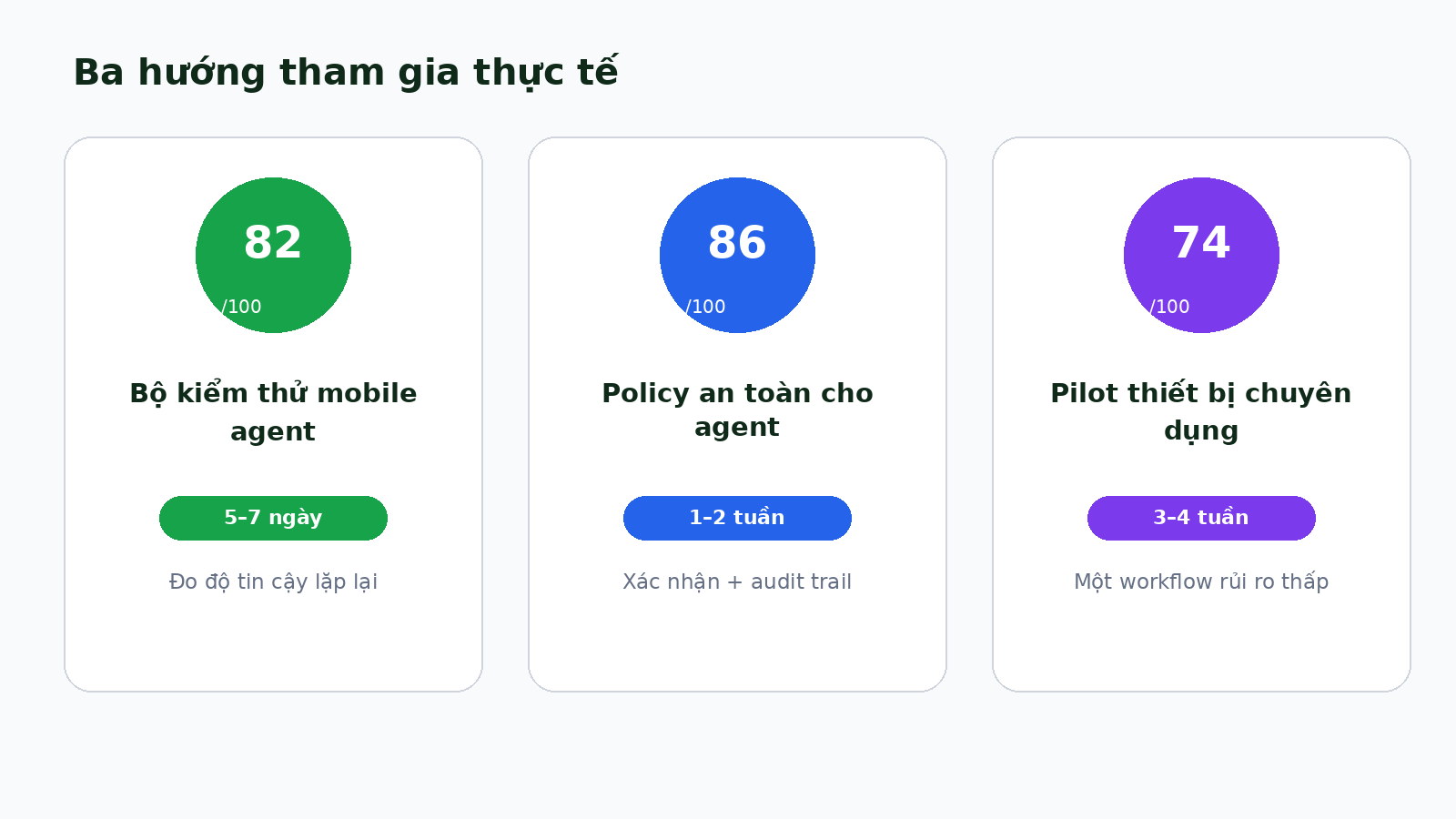 Three participation paths compared by opportunity score and effort.
If you want to start today
- In 30 minutes: Read the README, permission list, and security policy.
- In one day: Build the source or install the APK on an emulator or secondary phone without primary accounts.
- In seven days: Select ten low-risk tasks and record success rate, failure modes, and duration.
- After 30 days: Decide whether to contribute code, build a safety layer, or continue observing.
- Continue signal: Stable completion, useful logs, and confirmation at the right moments.
- Stop signal: Actions outside intent, unclear data transmission, or constant intervention.
Signals to keep watching
- An independent OpenDroid-specific benchmark.
- Public security audits and advisories.
- AppFunctions reaching beta or stable and expanding beyond private preview.
- Per-tool permission controls instead of broad device-control access.
- User retention after the novelty period.
- Migration from “look and tap” toward structured APIs.
Conclusion
OpenDroid turns mobile-agent architecture into code you can inspect, build, and test. The rational posture is to experiment under controls and learn from the architecture, not to delegate broad autonomy on a primary phone. Urgency is moderate; the decisive questions remain accuracy and safety as interfaces, applications, and context keep changing.
References
- OpenDroid repository — GitHub, accessed August 24, 2026 — Source, architecture, advertised features, permissions, and license.
- OpenDroid Releases — GitHub, accessed August 24, 2026 — APKs and release contents.
- OpenDroid Roadmap — GitHub, updated August 20, 2026 — Version status, tests, CI, and recent features.
- Overview of AppFunctions — Android Developers, updated July 31, 2026 — Experimental-preview status and the on-device tool model.
- The Intelligent OS — Android Developers Blog, February 25, 2026 — AppFunctions direction, UI automation, and user-control principles.
- AndroidWorld: A Dynamic Benchmarking Environment for Autonomous Agents — Google Research, May 23, 2024 — The 116-task benchmark and 30.6% baseline result.
- AndroidLab: Training and Systematic Benchmarking of Android Autonomous Agents — ACL 2025 — Training results and the remaining Android-agent reliability gap.